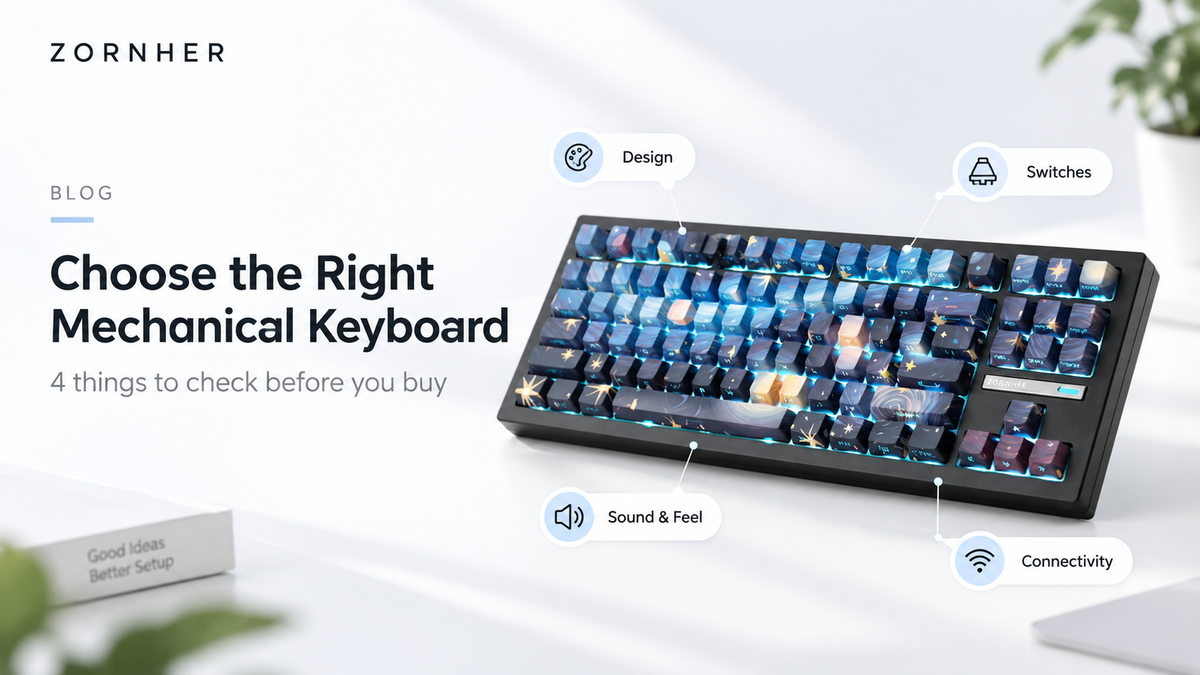
Choosing a mechanical keyboard is not only about price or switch specifications. The right keyboard should match your preferred layout, typing feel, sound profile, connectivity needs, and personal style.
This guide explains four common mistakes first-time buyers make and how to choose a keyboard that suits the way you work, play, and create.

Mistake 1: Choosing a Keyboard Based Only on Specifications

A lot of beginners start with: switches → price → brand. That's not wrong, but you're missing something important—this is the thing you're going to look at and touch for hours every single day.
Do you really want to stare at a generic black slab of plastic while you work, game, or create?
At Zornher, we believe your keyboard should have as much personality as your outfit. That's why we create designs like Wave of Kanagawa, Starry Night, spider-web IMD PC keycaps, black-and-white topographic maps, and Midnight Purple—each one tells a different story.
The takeaway: Don't treat your keyboard like just another tool. It's one of the most visible things on your desk. Pick a design that makes you smile every time you sit down. A keyboard is one of the most visible objects on your desk, so its design should complement your workspace and personal style.
Mistake 2: Ignoring Hot-Swap Support
 This is the #1 trap for first-time buyers—and it's a costly one.
Most people don't know what switch they actually like until they've lived with a keyboard for a few weeks. Clicky blues feel great but might drive your coworkers crazy. Linear reds are smooth but some find them "boring." Tactile browns are versatile but maybe not exciting enough.
If your keyboard doesn't support hot-swapping, your choice is permanent. Wrong switch? Too bad—either learn to live with it or buy a whole new keyboard.
Many ZORNHER mechanical keyboards support hot-swappable switches. Always check the specifications on the individual product page to confirm switch compatibility., compatible with both 3-pin and 5-pin mechanical switches. No soldering, no technical skills—just a switch puller and you're good to go.
What does that mean for you? Today you love linear smoothness. Next month you want to try tactile feedback. A year from now you want to build a silent setup for the office. One Zornher keyboard grows with you through all of it.
The takeaway: Unless you're 100% sure about your switch preference for life, only buy hot-swappable. It's your ticket to the wonderful world of keyboard customization.
Mistake 3: Buying Before Listening to the Sound


There's a saying in the mechanical keyboard community: "Feel is king, sound is soul."
Beginners get hung up on specs—"XX grams of actuation force," "linear vs. tactile"—but specs can't tell you how a keyboard actually feels and sounds under your fingers. You have to hear it.
Zornher keyboards are equipped with creamy-sounding linear switches, pre-lubed from the factory, paired with a gasket-mounted structure and internal sound-dampening foam. The result? A typing experience that's soft, bouncy, and deeply satisfying—what the community calls "creamy".
One of our users put it simply: "it actually sounded 1:1 as the viral TikToks of it." No surprises, no disappointment—just exactly what you wanted.
The takeaway: Always listen before you buy. Specifications are useful, but listening to a real sound test can give you a much better idea of the typing experience.Keyboard sound is influenced by the switches, keycaps, case materials, mounting structure, lubrication, and internal sound-dampening materials. Whenever possible, compare real sound tests before purchasing. Check out real user reviews and sound tests for any keyboard you're considering. Zornher's "creamy" sound profile has been described as "music for the fingers"—and once you hear it, you'll know.
Mistake 4: Choosing the Wrong Layout or Connectivity

A keyboard can have excellent switches and sound but still feel inconvenient if the layout does not match your daily needs.
Compact layouts save desk space, while larger layouts retain dedicated function keys, navigation keys, or a number pad. Before purchasing, consider which keys you use every day.
Connectivity is equally important. Depending on the model, a keyboard may support USB-C wired, Bluetooth, or 2.4GHz wireless connections. Check the individual product page to confirm the supported connection modes and device compatibility.
Mechanical Keyboard Buying Checklist
Choose a layout that includes the keys you use every day.
Decide whether you prefer linear, tactile, or clicky switches.
Look for hot-swap support if you want to change switches later.
Listen to real sound tests before purchasing.
Check Windows and macOS compatibility.
Confirm whether you need wired, Bluetooth, or 2.4GHz connectivity.
Review the exact specifications of the model before ordering.
Which ZORNHER Keyboard Is Right for You?
Choose a ZORNHER keyboard based on the features that matter most to you:
• For a compact desk setup, consider a smaller layout.
• For gaming and everyday typing, look for a layout with dedicated arrow keys.
• For office work and spreadsheets, consider a keyboard with a number pad.
• For customization, check for hot-swap support and software compatibility.
• For sound and feel, listen to real typing tests before choosing.

Final Thoughts
The best mechanical keyboard is not necessarily the one with the longest specification list. It is the one that matches your preferred layout, typing feel, sound, connectivity needs, and personal style.
Take time to compare the features that matter to you, listen to real sound tests, and review the specifications of each model before making your choice.

Laisser un commentaire
Ce site est protégé par hCaptcha, et la Politique de confidentialité et les Conditions de service de hCaptcha s’appliquent.